
Inquiry List
In opswitch, you can submit inquiries (tickets) directly from the console and communicate with our support team.
Click “Contact Us” from the icon menu at the top right of the header to open the inquiry list screen.
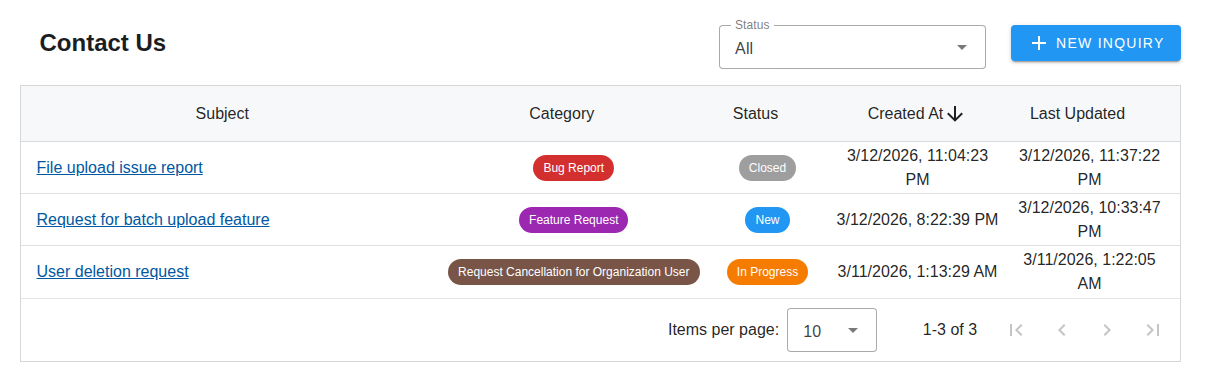
List Columns
Section titled “List Columns”The list displays the following information.
| Column | Description |
|---|---|
| Subject | The subject of the inquiry. Click to go to the detail screen |
| Category | The category of the inquiry |
| Status | The current status of the inquiry |
| Created At | The date and time the inquiry was submitted |
| Last Updated | The date and time of the last update |
Statuses
Section titled “Statuses”Inquiries have the following statuses.
| Status | Description |
|---|---|
| New | The inquiry has just been submitted |
| In Progress | Support is working on the inquiry |
| Resolved | Support has completed the response |
| Closed | The inquiry is complete. No further replies can be made |
Filter by Status
Section titled “Filter by Status”Use the status dropdown at the top right of the screen to filter inquiries by status. Select “All” to display inquiries of all statuses.
Create a New Inquiry
Section titled “Create a New Inquiry”Click the “New Inquiry” button at the top right of the screen to go to the new inquiry creation screen.