
Start/Stop DB instance
You must have AWS Account Linkage version 3.0 or higher to run this job. Please see the following page for information on updating permissions.
Update your linked AWS account to use new features
Supported DB engines are MySQL and PostgreSQL, MariaDB, Oracle, and SQL Server.
Amazon Aurora MySQL and Amazon Aurora PostgreSQL are not supported for this task. Tagging these DB instances will not be processed and will not result in an error.
See “Start/Stop DB cluster” on starting and stopping Aurora DB clusters.
Amazon RDS for SQL Server DB instances in multi-AZ cannot be stopped due to Amazon RDS specifications. Tagging and processing will result in an error.
The procedure for creating a task is as follows.
- From the header menu, click “TASK” - “RDS” - “Start/Stop DB instance”.
- A list of tasks will be displayed. Once you have created a task, you can edit or delete it from this screen. At first, there are no tasks, so click the CREATE button.
- Enter the conditions and click the CREATE button.
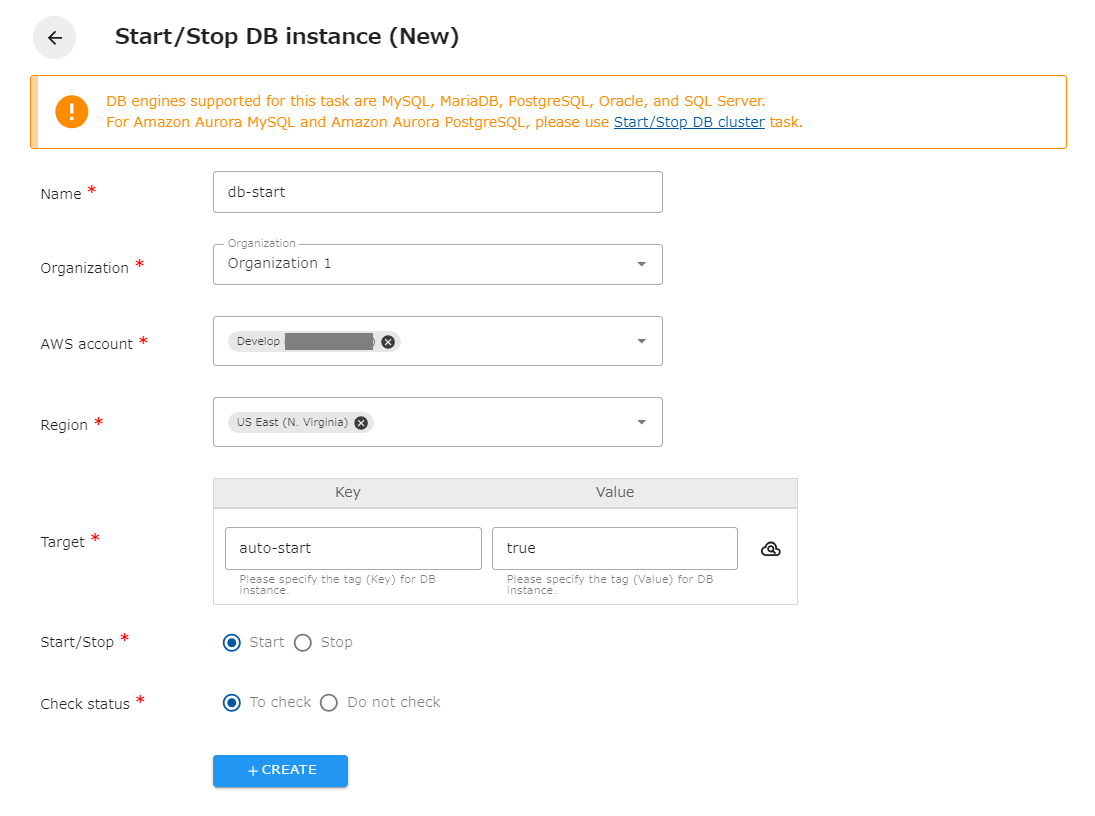
The following is a description of the items on the screen.
| Name | The name of the task. |
|---|---|
| Organization | Specify the organization. Members of the same organization can browse and edit. |
| AWS account | Linked AWS accounts will be displayed. Select the target AWS account. |
| Region | Select the target region. |
| Target | Specify the tag (Key and Value) of the DB instance you wish to operate. You can also set the same tag to multiple DB instances to start or stop them all at once. |
| Start/Stop | Select whether to start or stop the DB instance. |
| Check status | Checks the status of the created resource. If checked, success is considered when the created resource is completed. If not checked, success is considered when the API returns a successful response. |
- The DB instance will automatically start within 7 days after the shutdown.