
Change Plan
In Change Plan, you can change the currently contracted plan to another plan (Free Plan, Entry Plan, or Standard Plan).
When you change a plan, the current contract is canceled and a new contract is created.
Information such as the contractor name, address, contact, and Organizations is automatically carried over to the new contract.
The procedure for changing a contract plan is as follows.
Important Notes
Section titled “Important Notes”Changing a plan cancels the current contract and creates a new one.
Before proceeding, please review the following points.
- Contractor name, address, contact, and Organizations are automatically carried over to the new contract
- On the Change Plan screen, only the Representative AWS Account ID can be changed
- To change other information, use Edit Registration Information after completing the plan change
Procedure
Section titled “Procedure”From the contract list on the Contract Management screen, click the ︙ (three-dot) menu in the row of the contract whose plan you want to change.
Select Change Plan from the dropdown menu.
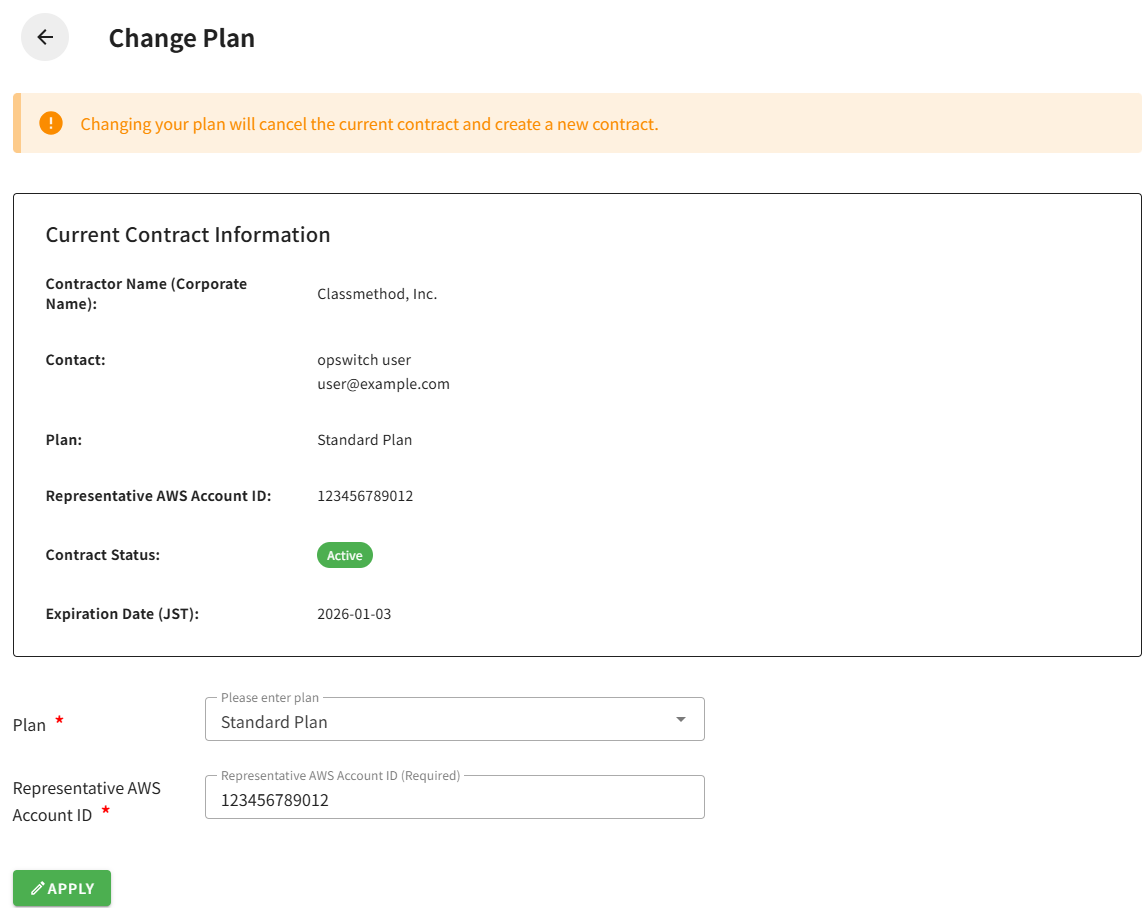
The Change Plan screen will be displayed.
At the top of the screen, the following notice is shown:
Changing a plan cancels the current contract and creates a new contract.
Current Contract Information
Section titled “Current Contract Information”The screen displays the current contract information.
Contractor Name (Corporate Name)
Contact
Name and email address
Plan
Representative AWS Account ID
Contract Status
Expiration Date
Displayed only when applicable
Changeable Fields
Section titled “Changeable Fields”Plan (Required)
Select the new plan.
- Free Plan
- Entry Plan
- Standard Plan
Representative AWS Account ID
Enter the AWS account ID (12-digit number).
- Required for the Entry Plan and Standard Plan
- Optional for the Free Plan
After entering the required information, click the Apply button at the bottom of the screen.
Once the plan change is complete, you will be returned to the Contract Management screen, and a message saying “Plan changed successfully.” will be displayed.
Changing to the Entry Plan
To change to the Entry Plan, prior purchase through AWS Marketplace is required.
Changing to the Standard Plan
When changing to the Standard Plan, you must specify an AWS account ID that has an active Classmethod Members contract as the Representative AWS Account ID.
Canceled Contracts
Canceled contracts cannot be changed.