
View Contract Details
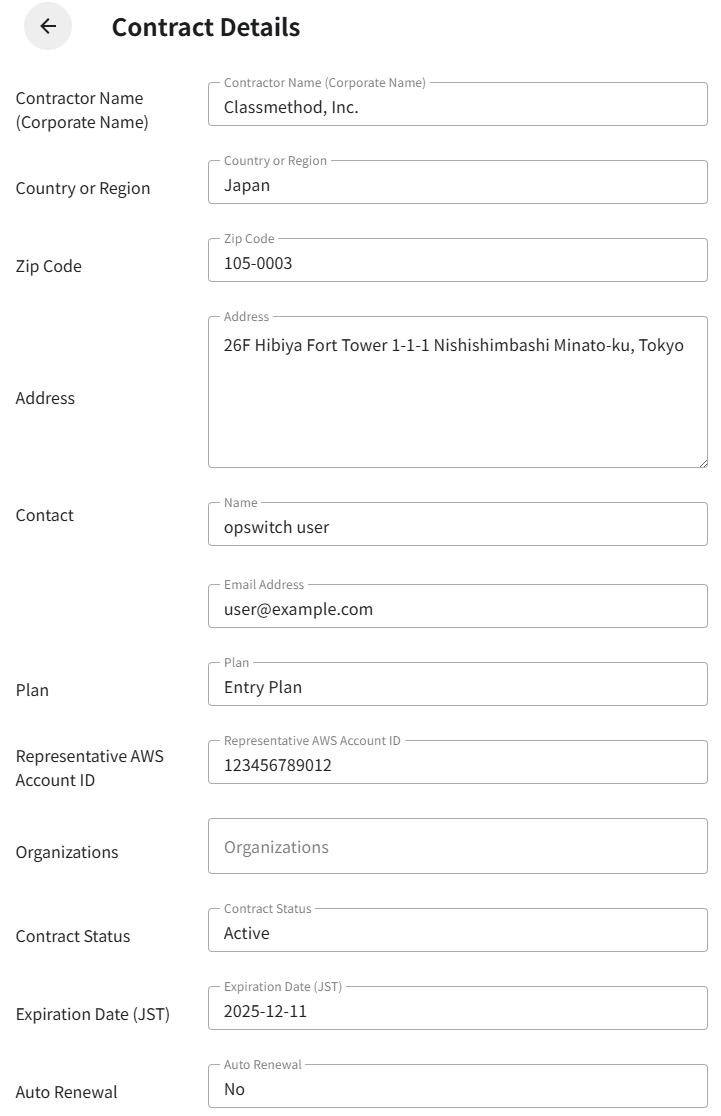
On the Contract Details screen, you can view all registered information for a contract.
Information such as the contractor name, address, contact, plan, Representative AWS Account ID, Organizations, contract status, expiration date, and auto renewal is displayed.
This screen is for viewing only, and no information can be edited.
The procedure for viewing contract details is as follows.
Procedure
Section titled “Procedure”From the contract list on the Contract Management screen, click the Contractor Name of the contract you want to view.
The Contract Details screen will be displayed, where you can review the following information.
Information Displayed
Section titled “Information Displayed”Contractor Name (Corporate Name)
Country or Region
Zip Code
Address
Contact
Name and email address
Plan
One of the following: Free Plan, Entry Plan, or Standard Plan
Representative AWS Account ID
Organizations
A list of Organizations associated with this contract
Contract Status
Active or Canceled
Expiration Date (JST)
The contract expiration date (displayed only when applicable)
Auto Renewal
Enabled or Disabled
All information on this screen is read-only and cannot be edited directly.
To make changes, use the operation menu from the contract list.