
Copy EC2 Backup across regions
You must have AWS Account Linkage version 3.0 or higher to run this job. Please see the following page for information on updating permissions.
Update your linked AWS account to use new features
The procedure for creating a task is as follows.
- From the header menu, click “TASK” - “EC2” - “Copy EC2 Backup across regions”.
- A list of tasks will be displayed. Once you have created a task, you can edit or delete it from this screen. At first, there are no tasks, so click the CREATE button.
- Enter the conditions and click the CREATE button.
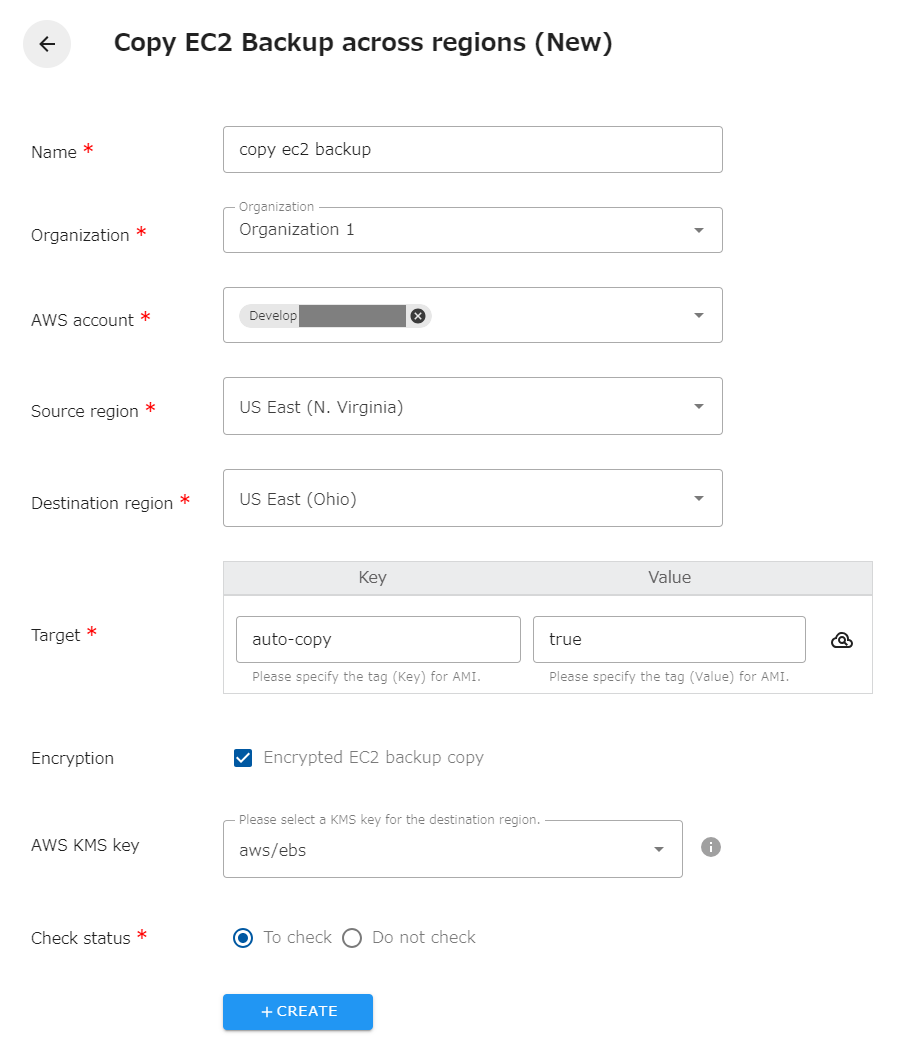
The following is a description of the items on the screen.
| Name | The name of the task. |
|---|---|
| Organization | Specify the organization. Members of the same organization can browse and edit. |
| AWS account | Linked AWS accounts will be displayed. Select the target AWS account. |
| Source region | Select the target region.Select the target region. You cannot specify the same region as the copy destination. |
| Destination region | Select the destination region. The same region as the source cannot be specified. |
| Target | Specify the tag (Key and Value) of the EC2 Backup(AMI) you wish to operate on. You can also set the same tag for multiple EC2 Backup(AMI) to have the snapshots copied together. |
| Encrypted EC2 Backup copy | Check if encrypted EC2 Backup(AMI) are included in the target. You will be able to select the key for the destination region. If not checked, it will automatically be encrypted with AWS Managed type key (aws/ebs). |
| AWS KMS Key | Select a KMS key to encrypt/decrypt EC2 Backup(AMI) in the destination region, either an AWS managed type key (aws/ebs) or a customer managed type key created in the destination region. |
| Check status | Checks the status of the created resource. If checked, success is considered when the created resource is completed. If not checked, success is considered when the API returns a successful response. |
Regarding tags
Section titled “Regarding tags”The copied EC2 Backup(AMI) are automatically tagged with “cm-Task” and “creation_info”. Do not delete “cm-Task” and “creation_info” because they are necessary for management. Other tags are automatically attached to the original EC2 Backup(AMI).
Regarding generation management
Section titled “Regarding generation management”If an old EC2 Backup(AMI) is deleted in the source generation management, it will also be deleted in the destination. Only EC2 Backup(AMI) copied by the same task in opswitch will be deleted. Older EC2 Backup(AMI) copied manually or by another tool will not be deleted.
The destination EC2 backups(AMIs) will be tagged with the tags specified as targets in the “Copy EC2 Backup across regions” task. If you want to leave the destination EC2 Backup(AMI) out of the generation management, remove this tag.
When copying encrypted EC2 Backup(AMI)
Section titled “When copying encrypted EC2 Backup(AMI)”To copy encrypted EC2 Backup(AMI), select the KMS key in the destination region; AWS managed keys (aws/ebs) and customer-managed keys are available. However, the available customer-managed keys are subject to the following conditions. If they do not meet these conditions, an error will occur when executing the copy.
- Key type must be symmetric.
- Key status must be valid.
- The key user must include the IAM role created in the opswitch AWS account linkage; the IAM role name can be found on the opswitch “AWS Account Settings” page by opening the “Edit AWS Account linkage” page for the target AWS account .
- If the EC2 Backup with the target tag is encrypted with the “Copy encrypted EC2 Backup” unchecked, it will be copied with the AWS Managed type key (aws/ebs).
Please note that AWS account linkage version 8.0 or higher is required to use customer-managed keys.