Retry when some processes fail during job execution
Processing may fail due to an error returned by the AWS API in a running task. Cases of failure include the following.
- DB instance/DB cluster is being backed up and cannot be stopped.
- Cannot create a snapshot because the DB instance/DB cluster is stopped.
- EC2 instance fails to start due to insufficient capacity.
When such an error occurs, opswitch automatically retries up to nine times at regular intervals for each process. If there is a problem with the opswitch infrastructure, for example, a temporary network or service failure, it will retry at progressively longer intervals.
If an error occurs after the ninth retry, the job is aborted and terminated as a failure; if multiple tasks are configured for a job, the tasks after the failed task will not be executed. If notification is configured, a failure notification will be sent.
Options for Errors
Section titled “Options for Errors”The following tasks provide options for configuring behavior when specific errors occur.
- Creating EC2 Backup
- If the created AMI becomes FAILED, there is an option to recreate it. (It will re-create up to 9 times.)
- Creating tasks for starting and stopping EC2 instances
- If an EC2 instance cannot be started due to insufficient capacity, there is an option to start it with a different instance type.
Rerun failed jobs
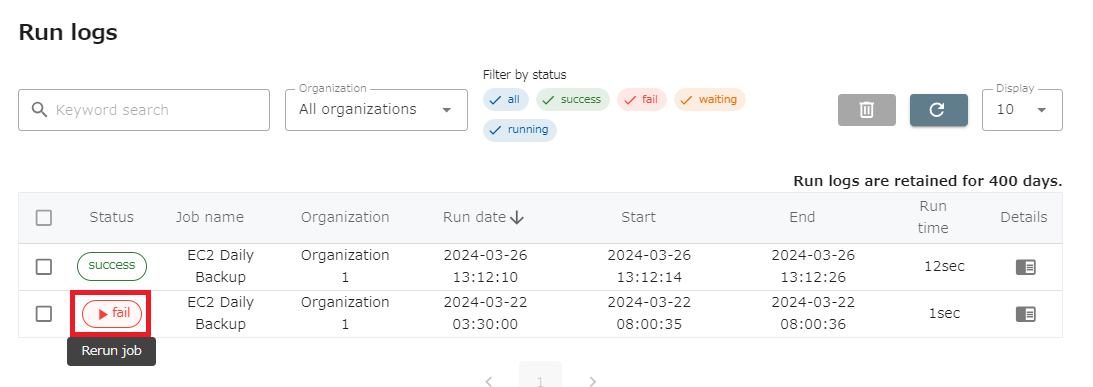
Section titled “Rerun failed jobs”To rerun a failed job, either execute it immediately from the list of jobs or rerun it from the execution history.
Rerun from job list
Section titled “Rerun from job list”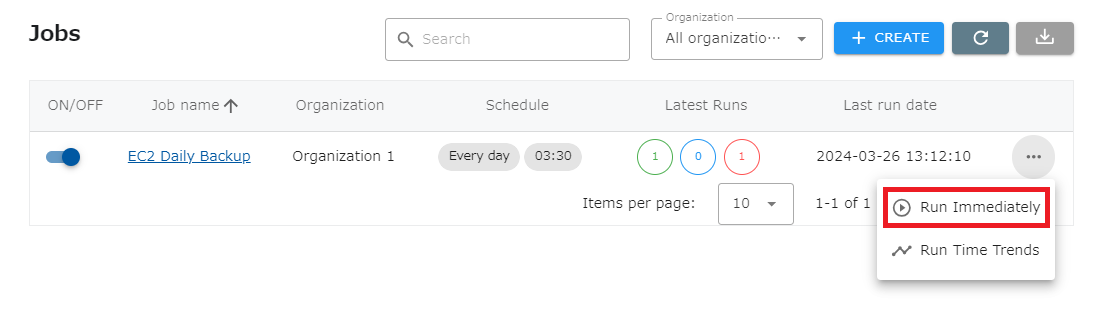
Rerun from run logs
Section titled “Rerun from run logs”Only failed jobs can be rerun from the run logs.