
Create DB snapshot
You must have AWS Account Linkage version 2.0 or higher to run this job. Please see the following page for information on updating permissions.
Update your linked AWS account to use new features
Supported DB engines are MySQL and PostgreSQL, MariaDB, Oracle, and SQL Server.
Amazon Aurora MySQL and Amazon Aurora PostgreSQL are not supported for this task. Tagging these DB instances will not be processed and will not result in an error.
See “Create DB cluster snapshot” on creating a snapshot of an Aurora DB cluster.
The procedure for creating a task is as follows.
- From the header menu, click “TASK” - “RDS” - “Create DB snapshot”.
- A list of tasks will be displayed. Once you have created a task, you can edit or delete it from this screen. At first, there are no tasks, so click the CREATE button.
- Enter the conditions and click the CREATE button.
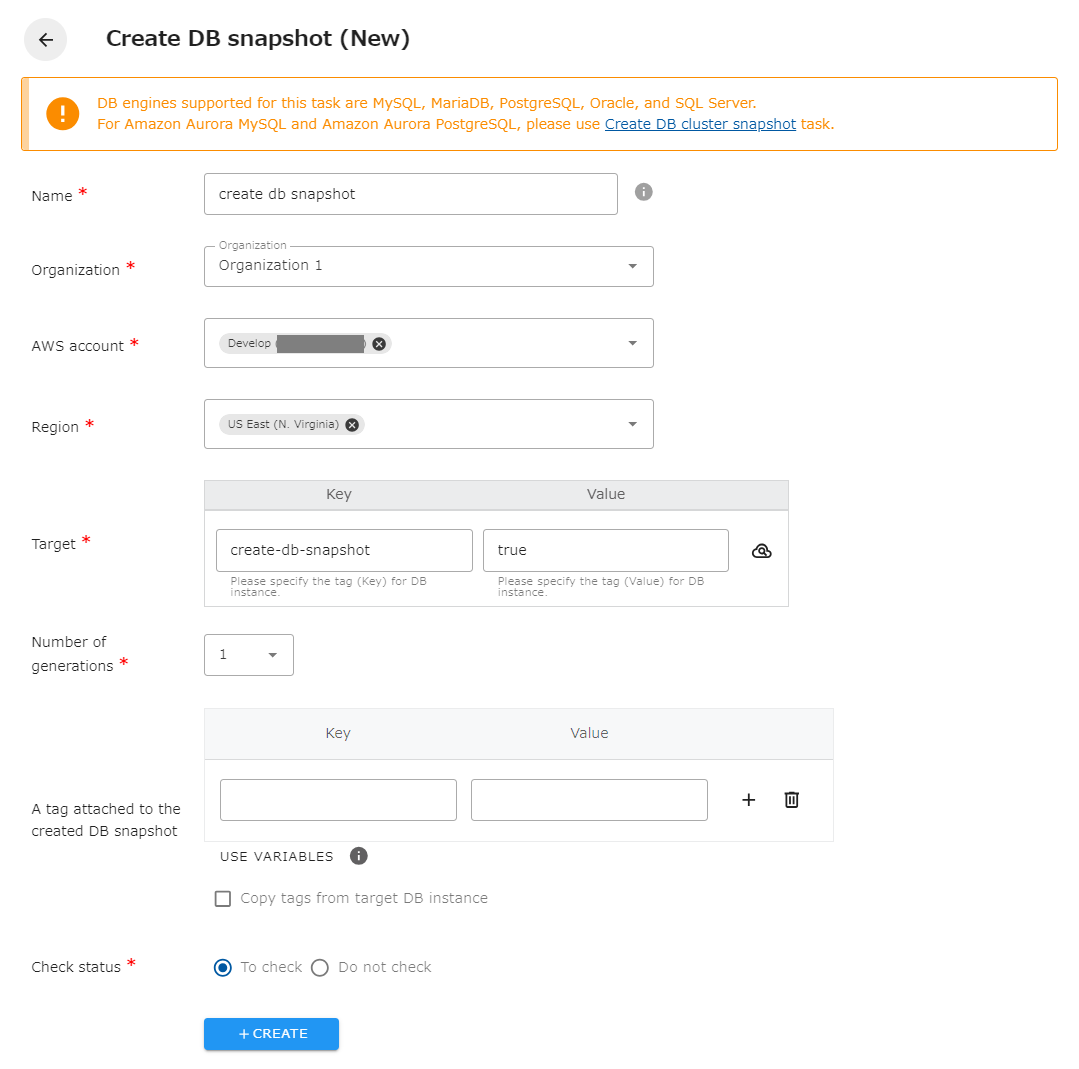
The following is a description of the items on the screen.
| Name | The name of the task. |
|---|---|
| Organization | Specify the organization. Members of the same organization can browse and edit. |
| AWS account | Linked AWS accounts will be displayed. Select the target AWS account. |
| Region | Select the target region. |
| Target | Specify the Key and Value of the DB instance for which you want to create an DB snapshot. You can also set the same tag for multiple DB instances to create DB snapshots at once. |
| Number of generations | Sets how many old DB snapshots to keep. If there are already as many DB snapshots as the number of generations, the oldest one will be deleted upon creation. |
| A tag attached to the created DB snapshot | Set tags to be attached to the created DB snapshots. |
| Check status | Checks the status of the created resource. If checked, success is considered when the created resource is completed. If not checked, success is considered when the API returns a successful response. |
Variables that can be used to tag the DB snapshots you create
Section titled “Variables that can be used to tag the DB snapshots you create”You can use variables to set values for the tag Value. The available variables are as follows.
| Variables | Description |
|---|---|
| ${target_id} | Set the target ID. |
| ${execute_date} | Set the job execution date. Example: 2024-03-26 |
| ${execute_datetime} | Set the job execution date and time. Example: 2024-03-26_0530 |
| ${task_name} | Set the task name. |
| ${job_name} | Set the job name. |
Limit of tags to attach to created DB snapshots
Section titled “Limit of tags to attach to created DB snapshots”The maximum number of tags that can be attached to a created DB snapshot is 50. If you try to attach more than 50 tags when executing a job, an error will occur. db_instance_identifier, cm-Task, and creation_info tags must be attached to the DB snapshot creation task. Please be careful not to exceed 50 tags together with the tags to be copied and the tags specified in the task’s configuration screen.
Regarding generation management of created DB snapshots
Section titled “Regarding generation management of created DB snapshots”DB snapshots created by a job have a tag cm-Task. The value is the name of the task that created that DB snapshot. Generation management is performed in DB snapshots that have the same DB instance as the Backup source and the same cm-Task tag value. DB snapshots created by another task or manually created DB snapshots are not deleted in job generation management.
Please note that if the task name is changed during operation, DB snapshots created prior to the task name will not be included in the generation management.
DB snapshots without the cm-Task tag will not be deleted by the job, so if you want to keep the DB snapshots you created, delete the cm-Task tag.
Please note that DB snapshots created with the previous version of opswitch have the “cm-Job” tag instead of the “cm-Task” tag. Those DB snapshots will be subject to generation management after migrating to the current version of opswitch.
Regarding the restoration of created DB snapshots
Section titled “Regarding the restoration of created DB snapshots”If you want to restore from the DB snapshot you created, please login to the Management Console and restore from the RDS screen. The documentation on the official site is as follows
Tutorial: Restore an Amazon RDS DB instance from a DB snapshot
The task of creating a DB snapshot will result in an error if it is performed on a stopped DB instance. Due to AWS specifications, the same error occurs when trying to create a snapshot in the Management Console. Please execute the task on a running DB instance.