
Apply for a New Contract
When applying for a new contract, select the plan to use with opswitch (Free Plan, Entry Plan, or Standard Plan) and register the contract information.
By associating the contract with Organizations, members of those Organizations will be able to use the features available under the selected plan.
The procedure for applying for a new contract is as follows.
Procedure
Section titled “Procedure”Click the Apply button in the upper-right corner of the Contract Management screen.
The contract application form will be displayed. Enter the following information.
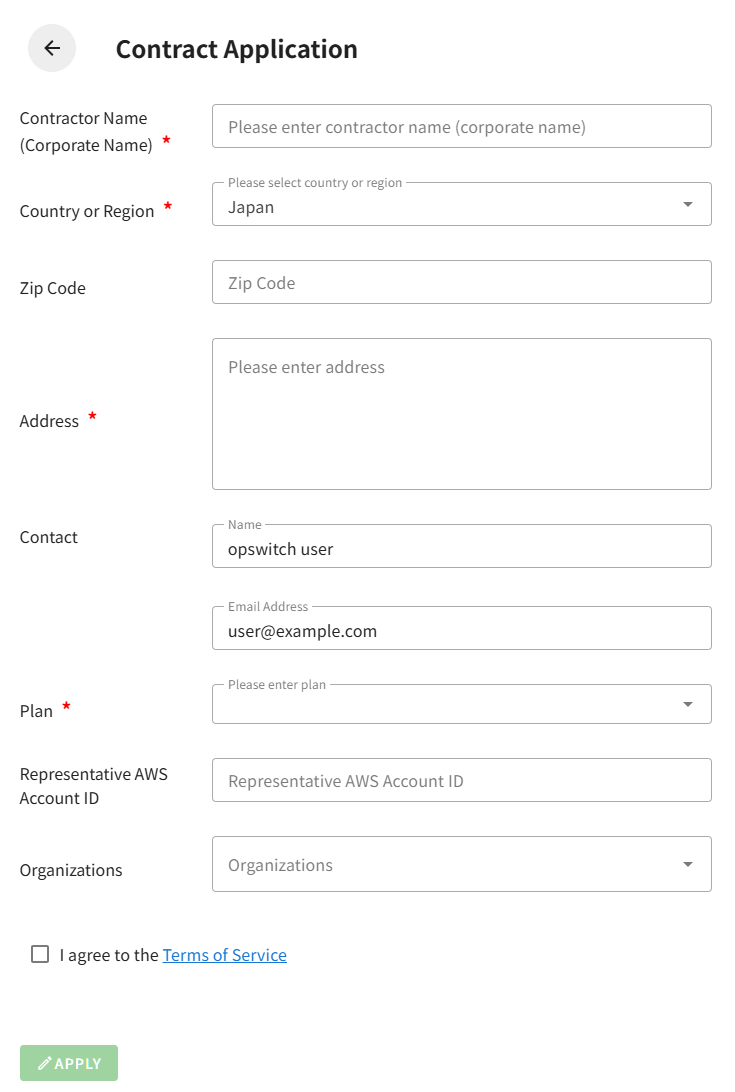
Required Fields
Section titled “Required Fields”Contractor Name (Corporate Name) (Required)
Enter the corporate or organization name to be registered as the contractor (up to 100 characters).
Country or Region (Required)
Select the country or region where the contractor is located.
The default setting is Japan (JP).
Address (Required)
Enter the contractor’s address (up to 500 characters).
Contact
The name and email address of the currently logged-in user are automatically set as the contract contact.
This information cannot be changed.
Plan (Required)
Select one of the following plans.
- Free Plan
- Entry Plan
- Standard Plan
Representative AWS Account ID
Enter the AWS account ID (12-digit number).
- Required for the Entry Plan and Standard Plan
- Optional for the Free Plan
Optional Fields
Section titled “Optional Fields”Zip Code
Enter the contractor’s zip code (up to 20 characters).
Organizations
Select the Organizations to associate with this contract. Multiple selections are allowed.
Only Organizations that meet both of the following conditions can be selected.
- You have owner permissions
- The organization does not already have an active contract
Agreement to the Terms of Service
Section titled “Agreement to the Terms of Service”Select the “I agree to the Terms of Service” checkbox at the bottom of the screen.
You can review the Terms of Service by clicking the link next to the checkbox.
Apply Button
Section titled “Apply Button”After all required fields are completed and you agree to the Terms of Service, the Apply button becomes enabled.
Click the Apply button to complete the contract application.
Application Completion
Section titled “Application Completion”Once the application is completed, you will be returned to the Contract Management screen, and a message saying “Contract application has been submitted.” will be displayed.
Contact Information Error
If user attribute information (name) is not set in User Profile Settings, an error message will be displayed.
Please register your name in Management → User Profile Settings before applying for a contract.
Applying for the Entry Plan
To apply for the Entry Plan, prior purchase through AWS Marketplace is required.
For details, refer to Contract Process via AWS Marketplace.
Applying for the Standard Plan
For the Standard Plan, you must specify an AWS account ID that has an active Classmethod Members contract as the Representative AWS Account ID.