Skip to content
opswitch
Search
Ctrl
K
Cancel
Select theme
Dark
Light
Auto
Select language
日本語
English
Welcome to opswitch
Information
Recent News
Release Notes
2026/04/27 - v2.37.0 Release
2026/04/21 - v2.36.1 Release
2026/04/14 - v2.36.0 Release
2026/03/10 - v2.35.0 Release
2026-02-18 - v2.34.1 released
2026-02-17 - v2.34.0 released
2026-02-03 - v2.33.0 released
2026-01-13 - v2.32.0 released
2025-12-17 - v2.31.1 released
2025-12-02 - v2.31.0 released
2025-11-18 - v2.30.2 released
2025-09-02 - v2.30.1 released
2025-08-05 - v2.30.0 released
2025-07-15 - v2.29.0 released
2025-06-17 - v2.28.0 released
2025-05-27 - v2.27.0 released
2025-04-22 - v2.26.0 released
2025-03-25 - v2.25.0 released
2025-02-12 - v2.24.0 released
2025-01-28 - v2.23.0 released
2024-10-22 - v2.22.0 released
2024-10-08 - v2.21.0 released
2024-09-19 - v2.20.1 released
2024-09-18 - v2.20.0 released
2024-08-28 - v2.19.1 released
2024-08-27 - v2.19.0 released
2024-08-01 - v2.18.0 released
2024-07-17 - v2.17.0 released
2024-07-02 - v2.16.0 released
2024-06-24 - v2.15.1 released
2024-06-18 - v2.15.0 released
2024-06-04 - v2.14.0 released
2024-05-21 - v2.13.0 released
2024-04-22 - v2.12.2 released
2024-04-10 - v2.12.1 released
2024-03-26 - v2.12.0 released
2024/02/14 - v2.11.0 リリース
2024/01/30 - v2.10.0 リリース
2024/01/11 - v2.9.1 リリース
2024/01/10 - v2.9.0 リリース
2023/12/05 - v2.8.0 リリース
2023/11/21 - v2.7.0 リリース
2023/10/10 - v2.6.0 リリース
2023/09/26 - v2.5.0 リリース
2023/08/29 - v2.4.0 リリース
2023/08/01 - v2.3.6 リリース
2023/07/18 - v2.3.5 リリース
2023/07/04 - v2.3.4 リリース
2023/06/27 - v2.3.3 リリース
2023/06/13 - v2.3.2 リリース
2023/05/31 - v2.3.1 リリース
2023/05/30 - v2.3.0 リリース
2023/05/16 - v2.2.0 リリース
2023/03/28 - v1.33.0 リリース
2023/03/28 - v2.1.0 リリース
2023/02/28 - v1.32.1 リリース
2023/02/28 - v2.0.1 リリース
2023/01/30 - v1.32.0 リリース
2023/01/30 - v2.0.0 リリース
2023/01/17 - v1.31.0 リリース
2022/11/15 - v1.30.0 リリース
2022/06/29 - v1.29.0 リリース
2022/03/15 - v1.28.0 リリース
2022/02/24 - v1.27.1 リリース
2022/02/16 - v1.27.0 リリース
2022/01/18 - v1.26.0 リリース
2021/12/22 - v1.25.1 リリース
2021/12/15 - v1.25.0 リリース
2021/12/01 - v1.24.0 リリース
2021/11/11 - v1.23.1 リリース
2021/11/04 - v1.23.0 リリース
2021/10/06 - v1.22.0 リリース
2021/09/08 - v1.21.1 リリース
2021/08/25 - v1.21.0 リリース
2021/07/14 - v1.20.0 リリース
2021/06/30 - v1.19.3 リリース
2021/06/22 - v1.19.2 リリース
2021/06/16 - v1.19.1 リリース
2021/06/02 - v1.19.0 リリース
2021/05/12 - v1.18.0 リリース
2021/04/01 - v1.17.0 リリース
2021/03/17 - v1.16.1 リリース
2021/03/03 - v1.16.0 リリース
2021/01/26 - v1.15.0 リリース
2020/12/08 - v1.14.0 リリース
2020/11/10 - v1.13.0 リリース
2020/09/29 - v1.12.1 リリース
2020/08/25 - v1.12.0 リリース
2020/06/30 - v1.11.0リリース
2020/05/27 - v1.10.1リリース
2020/05/20 - v1.10.0リリース
2020/03/31 - v1.9.0リリース
2020/02/25 - v1.8.0リリース
2020/01/21 - v1.7.0リリース
2019/12/10 - v1.6.0リリース
2019/11/19 - v1.5.0リリース
2019/10/29 - v1.4.0リリース
2019/10/08 - v1.3.0リリース
2019/09/17 - v1.2.0リリース
2019/09/03 - v1.1.0リリース
2019/08/01 - v1.0.0リリース
Maintenance/Failures/etc.
[2026-04-27] Maintenance Notice
[2026-04-14] Action Required: AWS Resources with "insightwatch" in Their Names
[2026-04-14] Maintenance Notice
[2026-03-10] Maintenance Notice
[2026-02-17] Maintenance Notice
[2026-02-03] Maintenance Notice
[2026-01-13] Maintenance Notice
[2025/12/22] opswitch Terms of Service Update
[2025-12-17] Maintenance Notice
[2025-12-02] Maintenance Notice
[2025-11-18] Maintenance Notice
[2025-09-02] Maintenance Notice
[2025-08-05] Maintenance Notice
[2025-07-15] Maintenance Notice
[2025-06-17] Maintenance Notice
[2025-05-27] Maintenance Notice
[2025-04-22] Maintenance Notice
[2025-03-25] Maintenance Notice
[2025-02-12] Maintenance Notice
[2025-01-28] Maintenance Notice
[2024-10-22] Maintenance Notice
[2024-10-08] Maintenance Notice
[2024/09/24]opswitch利用規約改定のお知らせ
[2024-09-18] Maintenance Notice
[2024-08-29][Restored]Notice of AWS Outage
[2024-08-27] Maintenance Notice
[2024-08-01] Maintenance Notice
[2024-07-17] Maintenance Notice
[2024-07-02] Maintenance Notice
[2024-06-18] Maintenance Notice
[2024-06-04] Maintenance Notice
[2024-05-21] Maintenance Notice
[2024-05-08] Maintenance Notice (canceled)
[2024-04-10] Maintenance Notice
[2024/03/26]メンテナンスのお知らせ
[2024/02/14]メンテナンスのお知らせ
[2024/01/30]メンテナンスのお知らせ
[2024/01/10]メンテナンスのお知らせ
[2023/12/20]メンテナンスのお知らせ
[2023/12/05]メンテナンスのお知らせ
[2023/11/21] 既にサポートが終了したAmazon Aurora DB クラスター バージョンをご利用中のお客様へ
[2023/11/21]メンテナンスのお知らせ
[2023/11/08]メンテナンスのお知らせ
[2023/10/10]メンテナンスのお知らせ
[2023/09/26]メンテナンスのお知らせ
[2023/08/29]メンテナンスのお知らせ
[2023/08/22]メンテナンスのお知らせ
[復旧]2023/08/04 - EC2バックアップ作成ジョブとEBSスナップショット作成ジョブに障害が発生しました
[2023/08/01]メンテナンスのお知らせ
[2023/07/18]メンテナンスのお知らせ
[2023/07/04]メンテナンスのお知らせ
[2023/06/27]メンテナンスのお知らせ
[復旧][2023/05/31] 指定した時間になってもジョブが実行されない障害のお知らせ
[2023/05/30]メンテナンスのお知らせ
[2023/05/16]メンテナンスのお知らせ
[2023/03/28]メンテナンスのお知らせ
[2023/02/28]メンテナンスのお知らせ
[更新あり][2023/02/20]AWSアカウント連携を更新できない障害のお知らせ
[2023/02/14]メンテナンスのお知らせ
[2023/01/30]メンテナンスのお知らせ
opswitchのリニューアルに関するお知らせ
[2023/01/17]メンテナンスのお知らせ
[2022/12/20]年末年始期間のサポート休業のお知らせ
[2022/12/02]サインアップ時の確認コードのメールが届かない場合の対応
[2022/06/29]メンテナンスのお知らせ
[2022/06/14]メンテナンスのお知らせ
[2022/03/15]メンテナンスのお知らせ
[修正済み]2022/02/24 - AWSアカウント連携を作成できない障害のお知らせ
[2022/02/16]メンテナンスのお知らせ
[2022/01/18]メンテナンスのお知らせ
[2021/12/15]メンテナンスのお知らせ
[2021/12/01]メンテナンスのお知らせ
[修正済][2021/11/19]1つのアカウントで多くの組織に所属するとCSRFエラーが発生したり、ログインできなくなる障害が発生しています
[2021/11/11]メンテナンスのお知らせ
[修正済][2021/11/05]EC2バックアップのリージョン間コピータスクで障害が見つかりました
[2021/11/04]メンテナンスのお知らせ
[2021/10/06]メンテナンスのお知らせ
[2021/09/21]メンテナンスのお知らせ
[2021/09/08]サポートページのURL変更及びメンテナンス実施のお知らせ
[修正済][2021/08/30]opswitchの通知設定がリセットされてしまう障害が見つかりました
[修正済][2021/08/27]「Workspacesの起動」タスクで起動しない障害が発生しています
[修正済][2021/08/25]「EBSスナップショットの作成」タスクが完了しない障害が発生しておりました
[2021/08/25]メンテナンスのお知らせ
[2021/07/28]メンテナンスのお知らせ
[2021/07/14]メンテナンスのお知らせ
[2021/06/30]メンテナンスのお知らせ
[修正済]「一回だけ実行」のジョブ実行時にエラーが発生してもリトライされない障害が発生しています
[2021/06/16]メンテナンスのお知らせ
[2021/06/02]メンテナンスのお知らせ
[2021/05/12]メンテナンスのお知らせ
[2021/04/01]メンテナンスのお知らせ
[修正済]2021/03/16 - opswitchのweb画面にログインすると意図せず無効化していたジョブが実行されてしまう事象が発生しています。
[2021/03/03]メンテナンスのお知らせ
[復旧]2021/02/19 - AWSにて障害が発生しました
[2021/01/26]メンテナンスのお知らせ
[修正済]2021/01/04 - ジョブのスケジュールで1回だけ実行する場合の日付指定とカレンダー表示に関する注意
[2020/12/08]メンテナンスのお知らせ
2020/12/07 - 年末年始期間のサポート休業のお知らせ
[2020/11/10]メンテナンスのお知らせ
opswitch 新利用規約制定のお知らせ
[2020/08/25]メンテナンスのお知らせ
AWS基盤の問題でEC2バックアップに失敗する事象が発生しています
[2020/06/30]メンテナンスのお知らせ
[復旧]2020/05/21 - 障害のお知らせ
[2020/05/20]メンテナンスのお知らせ
[復旧]2020/05/15 - 障害のお知らせ
[2020/03/31]メンテナンスのお知らせ
[2020/02/25]メンテナンスのお知らせ
[2020/01/23] シドニーリージョンにてEC2関連のAWS APIに障害が発生しています。
[2020/01/21]メンテナンスのお知らせ
年末年始期間のサポート休業のお知らせ
[2019/12/10]メンテナンスのお知らせ
[復旧]2019/11/20 - 障害のお知らせ
[2019/11/19]メンテナンスのお知らせ
[復旧] 2019/11/06 - 障害のお知らせ
[2019/10/29]メンテナンスのお知らせ
[2019/10/08]メンテナンスのお知らせ
[2019/09/17]メンテナンスのお知らせ
[2019/09/03]メンテナンスのお知らせ
[復旧] 2019/08/23 - AWS にて障害が発生しております
[復旧]2019/08/22 - 障害のお知らせ
User Guide
Getting Started
Start opswitch
Tasks and Jobs
List of available tasks
Update history of major new features and changes
Tutorials
Launch EC2 only during fixed weekday hours
Create daily EBS snapshots at a fixed time
Create weekly EC2 backup (AMI) at a fixed day and time
Jobs
List of Jobs
Add a job
Output defined jobs and tasks to CSV
Run logs
Run time trend
Retry when some processes fail during job execution
Tasks
List of Tasks
Create EBS snapshot
Create EBS snapshot (VSS support)
Create EC2 backup
Start/Stop EC2 instance
Change EC2 instance type
Copy EBS Snapshot across regions
Copy EC2 Backup across regions
Change the capacity of Auto Scaling group
Change the number of tasks in ECS service
Create DB snapshot
Start/Stop DB instance
Copy DB snapshot across regions
Create DB cluster snapshot
Start/Stop DB cluster
Copy DB cluster snapshot across regions
Start/Stop DocumentDB cluster
Start/Stop Neptune cluster
Start WorkSpaces
Check for forgetting to stop resources
Start/Stop VM instance
Organizations
Create organization
Change organization name
Delete organization
Identify resources by organization
About organization holiday settings
Create organization holiday settings
Update organization holiday settings
User Management
Login with Classmethod ID
Withdraw from opswitch
Reset password
Edit user attributes
Password Settings
Set up MFA(multi-factor authentication)
Link your opswitch account to your Classmethod ID
Change language
Invite users
Change user's role
Remove user from organization
Operations that can be performed for each Role in opswitch
Check the MFA (multi-factor authentication) setting status of users belonging to your organization
Change your e-mail address
AWS Integration
List of Linked AWS accounts
Link to your AWS account
Check the details of Linked AWS account infomation
Delete AWS account linkage
Relink disabled AWS account linkages
Copy AWS account linkage
Update your linked AWS account to use new features
Permissions of IAM Role created by opswitch (v.11.0)
Permissions of IAM Role created by opswitch (v.10.0)
Permissions of IAM Role created by opswitch (v.3.0)
Permissions of IAM Role created by opswitch (v.4.0)
Permissions of IAM Role created by opswitch (v.5.0)
Permissions of IAM Role created by opswitch (v.6.0)
Permissions of IAM Role created by opswitch (v.7.0)
Permissions of IAM Role created by opswitch (v.8.0)
Permissions of IAM Role created by opswitch (v.9.0)
Upgrade IAM Role from v.8.0 or earlier to v.9.0 or later
Google Cloud Integration
List of Google Cloud Federations
Link to your Google Cloud project
Check the details of Google Cloud federation infomation
Delete Google Cloud federation
Reconnect Disabled Google Cloud Federation
Copy Google Cloud federation
Regarding the Google Cloud resources and IAM custom role permissions created by opswitch during integration (v.1.0)
Notifications
Set up to receive email notifications of maintenance and service disruption
Email notification settings for job run results
Slack notification settings for job run results
How to Create a Slack App and Webhook URL
Teams notification settings for job run results
Updating the Notification Destination URL Due to the Retirement of Office 365 Connectors in Microsoft Teams
Contracts
Contracts Overview
View Contract List
Apply for a New Contract
View Contract Details
Edit Registration Information
Change Plan
Cancel Contract
Contract Process via AWS Marketplace
For Entry Plan and Standard Plan Users Only: Request a limit increase
Members Only
For Classmethod Members Only: The Inheritance of the CmBillingGroup Tag to Backup Resources
For Classmethod Members Only: Skipping tasks due to Classmethod Members's region restriction
For Classmethod Members Only: Batch registration of multiple AWS accounts
Contact Us
Inquiry List
Create a New Inquiry
Inquiry Details
Others
Operation logs
Contact about opswitch
FAQ
Terms of Use
Select theme
Dark
Light
Auto
Select language
日本語
English
Edit user attributes
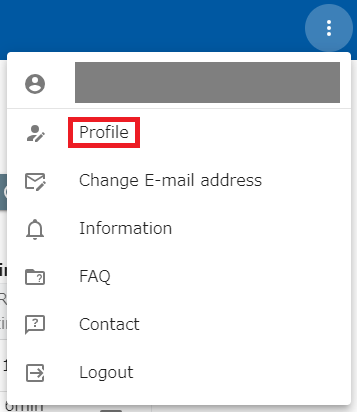
click on the dot icon on the far right of the header and click on ”Profile”.
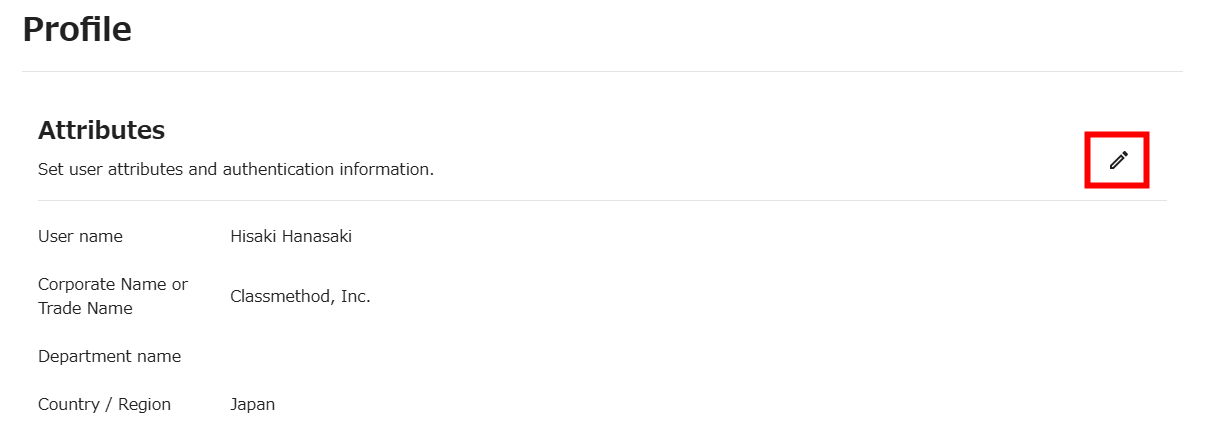
Click on the pencil icon.
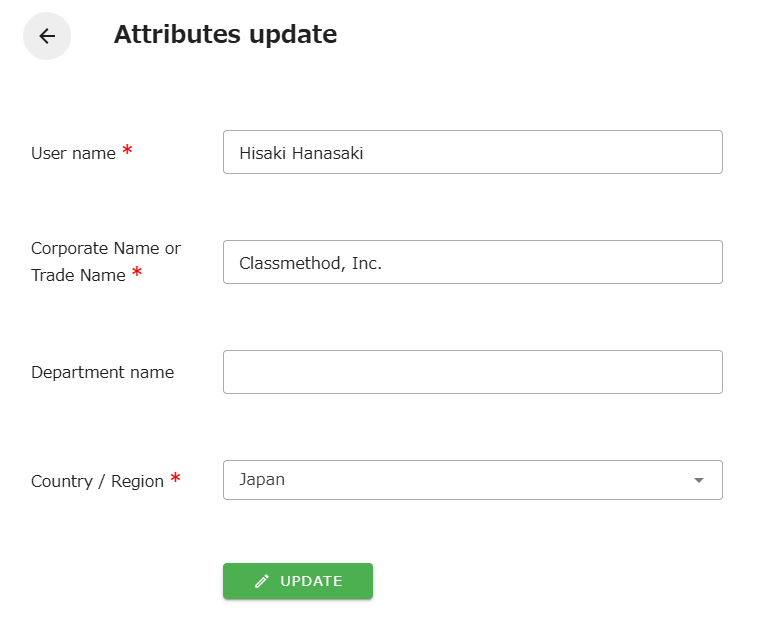
When the edit screen opens, press the “UPDATE” button to save.